The EVONOTE system is designed as a distributed platform, composed of three essential components: the tablet application (EPD device), the cloud server, and the web access interface. Together, these form a coherent educational ecosystem focused on handwriting, automatic synchronization, and long-term digital archiving.
General architecture (tablet – cloud – web)
The system allows multiple users to connect, each with one or more devices.
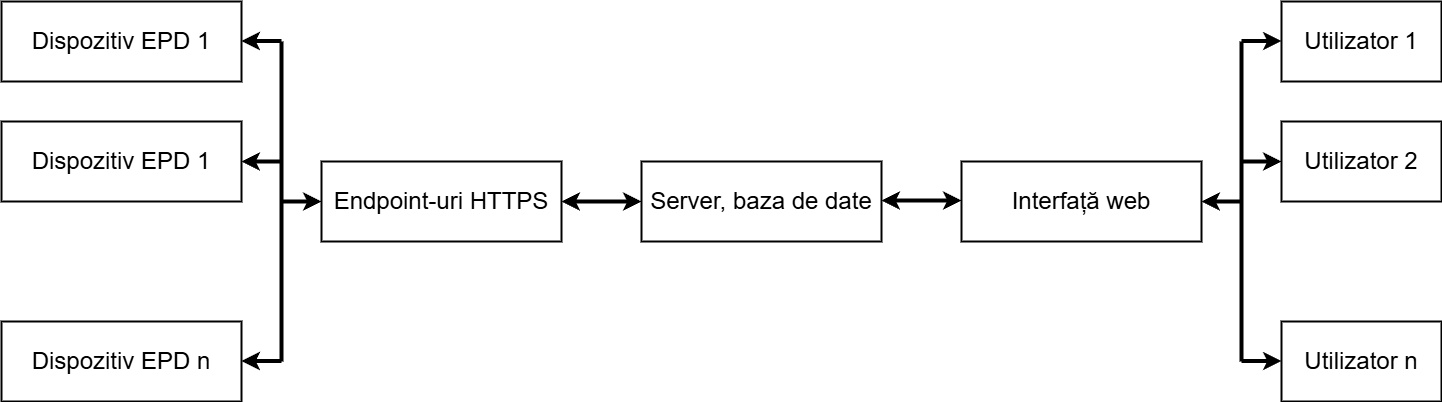
Translation: "Dispozitiv" = Device, "Interfață" = Interface, "Utilizator" = User
Initialization process
When the tablet is used for the first time, the application goes through a three-step initialization process:
- Creating the user account on the EVONOTE web platform;
- Enrolling the tablet, with a locally generated unique key (dkey), associated with the account and later used for authentication and identification;
- Defining notebooks on the web platform: each notebook has an IDbook, a subject, a school year, etc., and the application retrieves and stores them locally on the device.
Data flow and synchronization
- The tablet records handwriting data in the local SQLite database.
- At certain intervals or on demand, the data is sent to the server in JSON format, over a secure HTTPS connection.
- Each message includes:
- the dkey and IDbook;
- handwriting data (coordinates, pressure, timestamp);
- markers for interruptions (list_stop);
- the operation type (write / erase).
- The server validates the data using the dkey, stores it, and responds with a confirmation code, based on which the application marks the data locally as synchronized.
User access to written content
Once the data is synchronized with the server, the user can access it via the EVONOTE web interface. The platform allows:
- navigating through notebooks, page by page;
- viewing handwriting in a graphical format;
- downloading notebooks in PDF format.
This functionality ensures long-term archiving and allows easy access to notes from any device, without depending on the original tablet.
Updating notebook definitions
The application allows manually updating the notebook list through a dedicated button. The user typically uses this option when, for example, a notebook has been added or modified on the web platform.
- Newly defined notebooks are retrieved locally on request;
- Name or structure changes become visible after updating;
- Notebooks removed from the server become inactive on the tablet.
Note: Synchronization of written content only occurs in one direction — from the tablet to the server.
Multi-user and multi-device support
The EVONOTE system is designed for real-world educational contexts, with multiple users and devices:
- A user can operate several tablets, each with its own configuration;
- Each tablet is associated with a single user from the moment of enrollment;
- Multiple users are managed entirely separately, each with their own set of tablets and notebooks.
The architecture is designed to be easily scalable, with the possibility to extend to high volumes (tens or hundreds of thousands of users) through future adaptations of the hardware infrastructure and software system.